

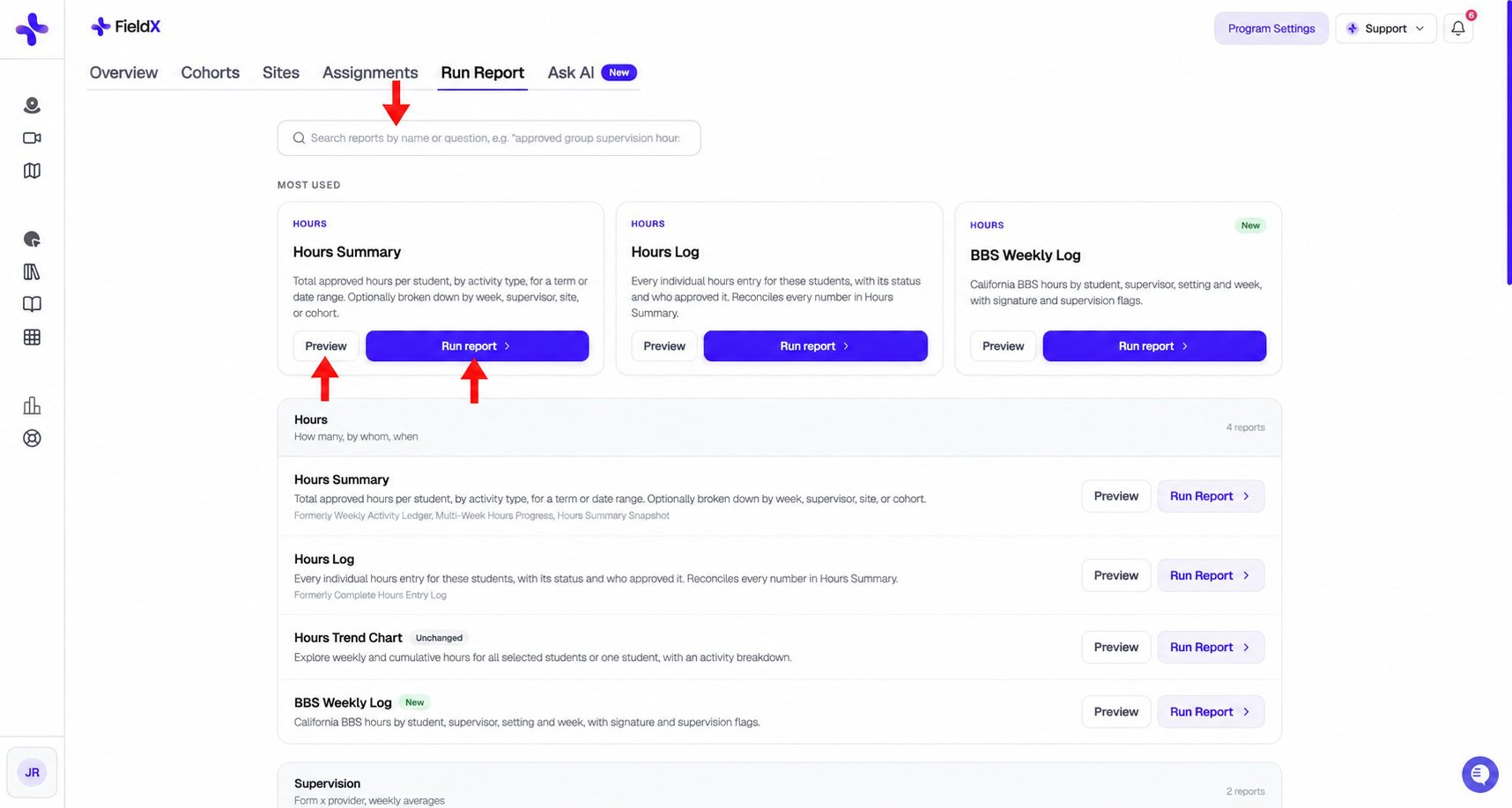
Search the catalog, read Preview, or select Run report to configure an export.
Choose a report
Hours
Hours Summary combines the former Weekly Activity Ledger, Multi-Week Hours Progress, and Hours Summary Snapshot. Hours Log replaces Complete Hours Entry Log. You can search the catalog using a former name.
Supervision and requirements
For Requirement Check, select an existing requirement set. Use Manage requirement sets in the catalog when you need to configure one first.
Forms and evaluations
Sites, supervisors, and system exports
Your program may also show specialized reports, such as BBS Weekly Log and Practicum Certification Summary, when the corresponding configuration is enabled. The catalog shows the reports available to your role and program.
Configure and run a report
- Click Preview on a catalog card to read what the report includes, or Run report to configure it.
- Choose the Population when available: terms, cohorts, sites, supervisors, or individual students.
- Set the reporting Period and any Experience type or Approval status filters.
- Review the report-specific options, such as Break down by, supervision thresholds, or a requirement set.
- Choose an Output format. Most tabular reports support Excel, CSV, and PDF; individual reports may offer fewer formats.
- Click Preview first 200 rows to inspect a sample, or generate the full file using the main action.