

These are product safeguards, not a legal determination. Your organization decides how HIPAA and FERPA apply to you, and you’re still responsible for your own consent, recording, and retention rules.
Consent comes first
- Live sessions. The host adds each client sitting with them under People in the room with you and collects their agreement to the displayed statement. People joining from their own devices agree on their own screens.
- Uploads. You name every client in the recording and confirm you have their signed consent, or confirm that no clients appear.
- Defaults to off. Transcription is off unless consent is on record.
- No consent, no AI. A recording can’t be linked to an assignment, and AI feedback can’t run, without consent from every client.
- Scheduled for you. If an admin schedules a session for you, the consent text names the admin and says they’ll have access to the recording.
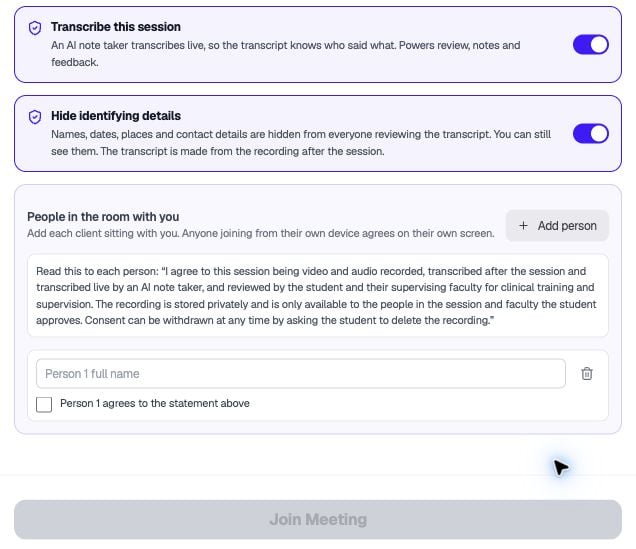
The consent form keeps Join Meeting disabled until the listed person's details and agreement are complete.
Who can see a recording
One rule decides, and it’s checked on every request:- The owner, and anyone the owner shared it with
- A participant, but only for recordings made while they were in the room
- The teachers of a class the student linked it to, through that class only
- A program admin or supervising faculty member, after the student approves, or without approval if your program has set a policy that allows admins to view
A record of every view
Every time a transcript, recording, comment summary, or AI result is opened, Meet writes it to an audit log first. The log can’t be edited or deleted. If the entry can’t be saved, nothing is shown.AI and vendors
- AI features and transcription use vendors covered by business associate agreements. Session content doesn’t go to general-purpose consumer AI services.
- Transcripts are treated as data, not instructions, and AI output is checked before it’s saved.
- There’s no transcript download, and screen replay tools are switched off on Meet pages.
Hide identifying details
Redaction replaces names and other identifiers for reviewers and for AI. It isn’t full de-identification, and the audio and video still contain everything. See Hiding identifying details.Student records
- A student decides when a recording is shared with a class by linking it. The confirmation says who will see it.
- Teachers only see recordings from their own class.
- Before a grade is released, students don’t see a grade, status, or instructor comments.
- Deleting a submission removes teacher access immediately.