> ## Documentation Index
> Fetch the complete documentation index at: https://app.simcare.ai/docs/llms.txt
> Use this file to discover all available pages before exploring further.
# Troubleshooting first-time issues
> Running into problems during your first session? Here are the most common fixes.
Running into problems during your first session? Here are the most common fixes.
## I can't hear the client
* Make sure your **speakers or headphones** are working
* Check that your **browser tab isn't muted**
* Try going back to the Discover page, click on the client again, and double-check your audio settings on the setup screen. Click **"Test Speaker"** on this page and ensure you hear a sound.
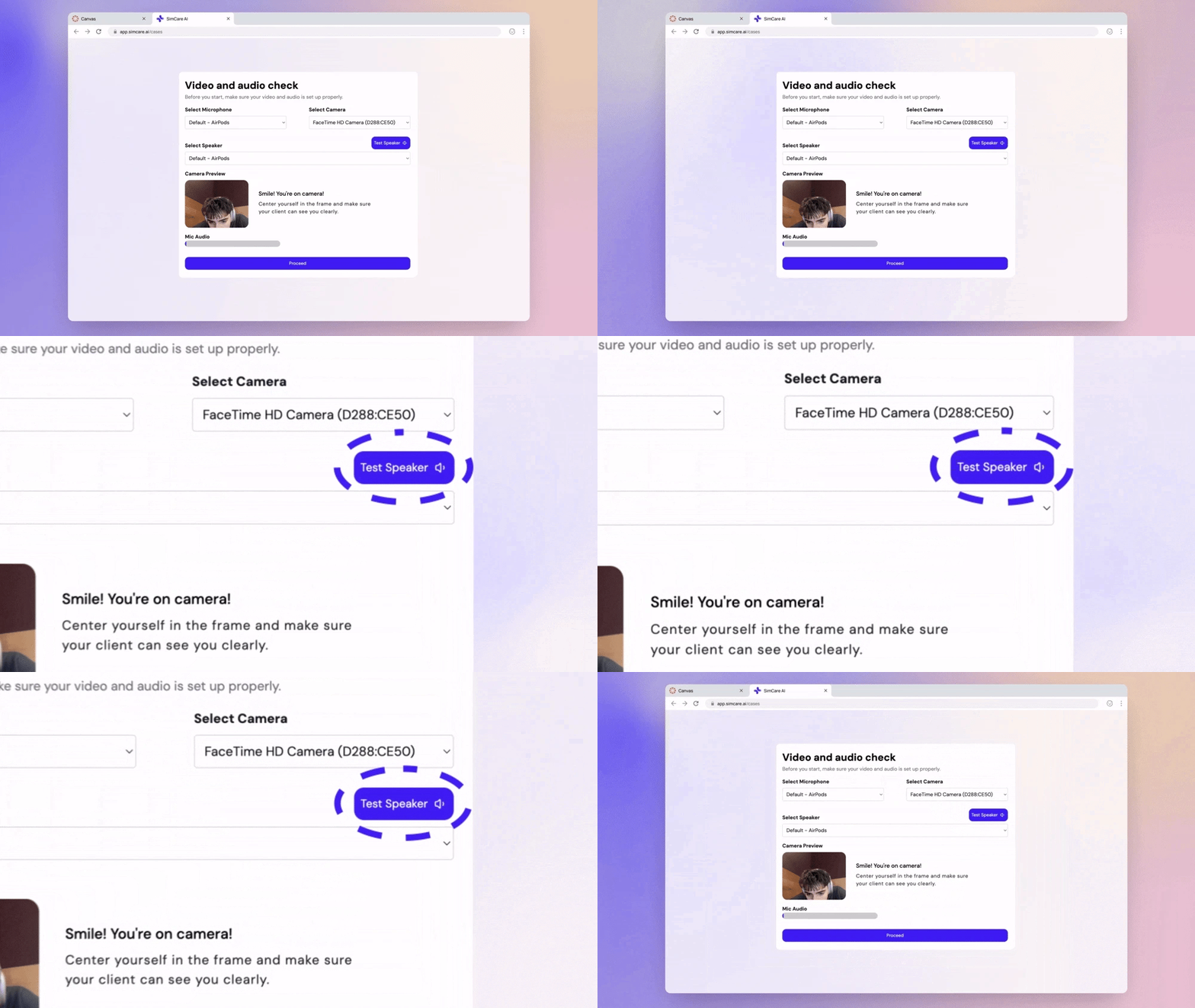 **If all else fails, refresh the page.**
## The client can't hear me
First, ensure you have **unmuted yourself**. Look for the microphone icon on the screen.
**If all else fails, refresh the page.**
## The client can't hear me
First, ensure you have **unmuted yourself**. Look for the microphone icon on the screen.
 **Most common issue: browser permissions**
If it's your first time, Chrome or Edge will ask to allow mic access. If you clicked **"Block"** by mistake, follow these steps:
1. Click the **settings lock icon 🔒** in your browser address bar (top left).
2. Toggle the switches to **Allow** microphone and camera access.
**Most common issue: browser permissions**
If it's your first time, Chrome or Edge will ask to allow mic access. If you clicked **"Block"** by mistake, follow these steps:
1. Click the **settings lock icon 🔒** in your browser address bar (top left).
2. Toggle the switches to **Allow** microphone and camera access.
 After fixing permissions, go back to the Discover page, click the client again, and double-check your mic settings on the setup screen.
## Nothing's loading / page is blank
* Use **Chrome** or **Microsoft Edge**.
* ❌ Safari and mobile browsers aren't supported yet.
* Try clearing your cache or using an **Incognito/Private window**.
## I can't log in
* Double-check your school email for typos.
* If using **SSO (Google/Microsoft)**, confirm you're logged into the correct account in your browser.
* Use the **"Forgot Password"** link if needed. You'll get an email to help reset your password. *Remember to check your spam folder!*
## Still stuck?
We are here to help.
* **Email us:** [hello@simcare.ai](mailto:hello@simcare.ai)
* **Join daily office hours:** For more complex issues, join us from 9–10am PST at [meet.google.com/amr-irgz-ecq](http://meet.google.com/amr-irgz-ecq)
After fixing permissions, go back to the Discover page, click the client again, and double-check your mic settings on the setup screen.
## Nothing's loading / page is blank
* Use **Chrome** or **Microsoft Edge**.
* ❌ Safari and mobile browsers aren't supported yet.
* Try clearing your cache or using an **Incognito/Private window**.
## I can't log in
* Double-check your school email for typos.
* If using **SSO (Google/Microsoft)**, confirm you're logged into the correct account in your browser.
* Use the **"Forgot Password"** link if needed. You'll get an email to help reset your password. *Remember to check your spam folder!*
## Still stuck?
We are here to help.
* **Email us:** [hello@simcare.ai](mailto:hello@simcare.ai)
* **Join daily office hours:** For more complex issues, join us from 9–10am PST at [meet.google.com/amr-irgz-ecq](http://meet.google.com/amr-irgz-ecq)